I came across a recent r/SEO thread where an agency owner asked how to explain an AI Overviews traffic drop to B2B clients. The replies covered real objections. Clients think SEO is broken. Agencies blame AI Overviews without proof. One person lost a client even though the diagnosis was right. After reading several threads like this, I decided to write this guide from our agency’s own experience about SEO reporting in the AI era.
People now get answers from Google’s AI Overviews and AI Mode, and from ChatGPT, Gemini, Claude and Perplexity, before they open a single website. A search that once ended on your client’s page can now end on a summary. This changes what an SEO report has to do.
An AI-era SEO report still covers rankings, clicks and traffic. It also has to show where the client is named and cited in AI answers, engine by engine, keep observed numbers apart from sampled ones, and tie everything to leads and revenue, ending with a decision.
The guide covers how to diagnose a drop before blaming AI, which metrics to report, how to calculate AI visibility by engine, how to build the dashboard and scale it across the clients, how to talk to clients, what a finished report looks like, and how to test whether your changes worked.
Key Takeaways
- More searches are answered without a click, so organic traffic alone cannot explain SEO performance.
- Diagnose the drop before blaming AI overviews. The research is mixed, and other causes still account for many declines.
- In your report, prioritise leads, conversions and revenue, using clicks, rankings and AI visibility as supporting evidence.
- Most of the data on AI visibility should be labeled as sampled or estimated and should be kept separate from numbers that you can observe directly.
- Calculate AI visibility the same way every month, with a fixed prompt set, or the trend line means nothing.
Why the Old Report Breaks
The classic SEO report was built on a simple chain. Rankings go up, traffic goes up, leads go up. Each link in that chain is now looser than it used to be, and clients feel it before agencies find the words to explain it.
Google’s AI Overview appears above the organic listings. A page can stay in position two and still lose visitors, because the summary above it has already given people what they wanted. The ranking survives. The attention doesn’t.
The table below sets a traditional SEO report beside the AI-era version, row by row.
| What you report | Traditional report | AI-era report |
|---|---|---|
| Visibility | Keyword rankings | Mentions, citations and share of voice, per engine |
| Traffic | Organic sessions | Clicks, plus AI impressions and AI referrals (undercounted) |
| Success | Rankings and traffic up | Leads and revenue, with visibility as support |
| Data | Mostly observed | Observed, plus sampled, and labeled |
Observed data comes from systems you can check, such as Search Console, GA4 and the CRM. Search Console now includes AI impressions, meaning how often your pages appeared in Google’s AI answers. Sampled data comes from running a fixed prompt set through AI engines and recording the answers, so it estimates visibility instead of counting it.
Pew Research Center tracked 68,879 searches by 900 US adults in March 2025. People clicked a regular result in 8% of visits when an AI summary appeared and 15% when it didn’t, and clicked a link inside the summary in just 1%.
Informational queries are the most exposed and we’ve seen that intent play out across our own client accounts. In Semrush’s analysis, 88.1% of queries that triggered AI Overviews were informational, against 8.69% commercial, 1.76% transactional and 1.43% navigational. A client whose traffic came from how-to posts and definitions is in the firing line.
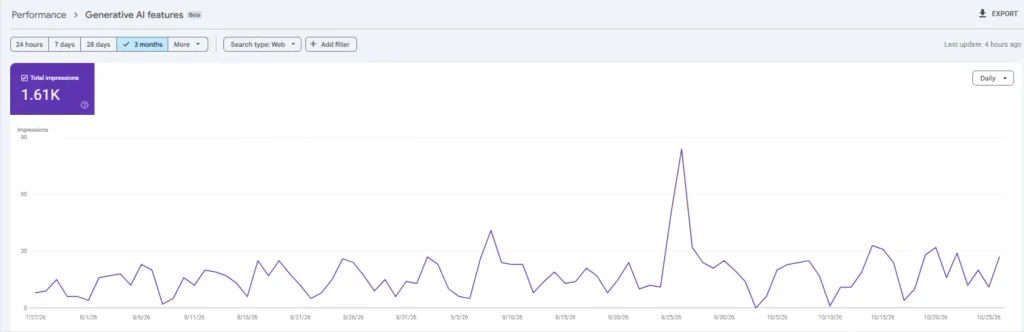
You can check whether your site has lost traffic to AI summaries in Search Console, but one quirk makes the chart look odd. Google has counted AI Mode clicks and impressions in the normal totals since mid-2025, so impressions can climb while clicks fall.
Across many of our brands, we’ve seen that much of the traffic lost to AI is discovery traffic, meaning early-stage researchers looking up a definition who were never about to buy. People on Reddit said their clients’ conversions stayed flat or improved while traffic fell, for that reason. Traffic loss sometimes costs nothing and sometimes costs a lot, and only the conversion data tells you which.
The Four Layers of an AI-Era Report
A report built around one traffic line can’t carry that weight anymore. I sort every number into four layers, and each layer answers one question the client might ask.
| Layer | The question it answers | Confidence |
|---|---|---|
| Business outcomes | Is SEO paying for itself? | Observed |
| Search performance | Are we visible, and are people clicking? | Observed |
| AI visibility | Do we show up where answers get written? | Mixed: impressions observed, mentions sampled |
| Demand | Is the brand getting stronger? | Observed |
Layers 1, 2 and 4 are observed data. Layer 3 is mixed, because Google’s AI impressions are observed while mentions in other AI engines are sampled. Business outcomes sit at the top because every other layer is evidence for them.
Read the layers from the top. If leads held, a click drop is a conversation about discovery traffic, the early-stage researchers who were never close to buying. If leads fell, you have a business problem and the AI explanation, however true, is secondary. Only then do you drop down a layer to find out why.
How To Diagnose Traffic Drop Before Blaming AI
Many agencies blame AI Overviews for a traffic drop because it’s the easy answer, and clients may even accept it. If you’re wrong, though, you’ve told them to ignore a problem you caused or missed. Here’s how I’d diagnose the traffic drop to see whether AI caused it.
1. Compare Search Console Data
Compare the drop period with the previous period and with the same period last year. An AI-related loss usually looks like steady or rising impressions, roughly unchanged positions and falling clicks. If you still rank in positions one to three and clicks fell, that’s an AI Overview effect. If positions slipped, it’s an SEO problem.
Search Console keeps about 16 months of data. To show how AI features changed a client’s clicks, export it monthly, or next year’s comparison will have nothing behind it.
2. Split Queries by AI Overview
I learned this from a Reddit thread, and I’d lean on it most. Split informational queries into two groups, those that show an AI Overview and those that don’t. If only the first group lost clicks, the client can see the cause in the numbers. If both dropped, the problem is rankings or demand, and the summaries were never the story.
- Export the informational queries that used to earn clicks from Search Console.
- Check which ones show an AI Overview. Search a short list by hand. For a longer one, use a tool that flags SERP features.
- Separate the list into groups with and without an AI Overview.
- Compare the click and CTR changes for each group over the same period.
The method has limits. Not everyone sees AI Overviews; the sample may be small, and tools capture a single snapshot. Treat the result as evidence rather than a verdict, and say so in the report.
3. Rule Out Causes
Before committing to the AI explanation, rule out the ordinary causes, like algorithm updates, manual actions, ranking losses, seasonality and technical problems. We add broken tracking, because a faulty GA4 tag or a consent banner change can look exactly like a traffic collapse.
4. Check With Leads and Revenue
The last step decides how the client conversation goes. Set organic sessions beside organic leads and revenue for the same period. If sessions fell 20% and leads held, the client lost visitors who weren’t buying. If both fell, there’s a real business problem and you should say so plainly. Conversions need to be tied to organic traffic first, so fix that before anything else.
Which Metrics to Report at Each Layer
1. Read the Signals Together
Once the diagnosis is done, the combinations of signals carry the interpretation:
| What you see | Likely reading | What to do |
|---|---|---|
| Clicks down, impressions steady, position steady, leads steady | Zero-click loss on informational queries. Low business risk. | Report it, show the segment split, keep watching |
| Clicks down, position down | A ranking problem. AI is not the story. | Fix the SEO. Check updates, technical issues, competitors |
| Clicks down, position steady, leads down | AI answers are costing real business | Shift effort toward commercial pages, protect lead-driving content |
| Clicks and leads steady, AI mentions down | A visibility risk, not yet a revenue problem | Treat as an early warning. Retest the prompts next month |
That last row matters. AI mentions can fall without anything showing up in leads for months, so I treat them as a leading signal at best, and I say so in the report.
2. Metrics and Where They Come From
The table below places each metric in its layer, shows where it comes from and says how far to trust it. You won’t put all of them in front of every client. I’d leave sentiment scores out for now. Vendors love them, but they’re the squishiest number in the stack, and I haven’t seen a client decide anything off one.
| Metric | Layer | Where it comes from | Type of data |
|---|---|---|---|
| Organic leads, conversions, revenue | 1 | GA4, CRM, e-commerce platform | Observed |
| Clicks, impressions, CTR, average position | 2 | Google Search Console | Observed |
| AI impressions in Google | 3 | Search Console generative AI report | Observed, impressions only |
| AI mentions and citations, per engine | 3 | Prompt tracking, manual checks or tools | Sampled |
| Share of voice in AI search | 3 | Prompt tracking or tools | Estimated |
| AI referral traffic | 3 | GA4 referral reports | Observed, but incomplete |
| Branded search demand | 4 | Search Console branded queries | Observed |
3. AI Visibility and Citations
Google now gives you some of this directly. Search Console added a generative AI performance report on June 3, 2026. It shows how often links to your pages appeared in AI Overviews and AI Mode. It reports impressions, not clicks, and those impressions are already inside your overall performance totals.
For ChatGPT, Gemini, Claude and Perplexity there’s no first-party report, so mentions and citations come from prompt sampling. A mention is a visibility signal. Whether it affects sales is a separate question, and for most clients you can’t fully answer it yet.
Position matters too, meaning whether the client is named first or buried in a list.
4. Share of Voice
Share of voice answers a competitive question. Out of all the prompts you track, how much of the conversation does the client own compared with the two or three competitors it actually worries about? It’s easy to overstate, because it depends on the prompts, the runs and the engines you chose. Always report it as an estimate.
5. AI Referral Traffic
Count the clicks that arrive from AI tools. In GA4, look at referral sources for the AI platforms and compare their engagement and conversion rates with organic. Attribution is the catch. In the AgencyAnalytics survey, 48% of agencies said they can’t reliably track people who discover a brand through AI tools, and visitors with no referrer get logged as direct. Digital Shift Media says clicks from AI Overviews are counted as ordinary organic search in GA4. So any AI referral number you report is a floor, not a total.
6. Leads, Revenue, and Assists
Show organic leads and revenue, then add assisted conversions to capture organic visits that helped a sale without being the last click. With AI discovery in the mix, multi-session journeys get messier, and the survey I mentioned found 47% of agencies struggling to attribute conversions across multiple sessions. So be careful with attribution claims. A line like “organic search assisted 14 of this month’s 40 demo requests” is more honest and more useful than a precise ROI number you can’t defend.
7. Branded Demand
Branded search is the quiet metric in all this, and here’s how I’d use it. Track whether branded impressions and clicks in Search Console are growing, and whether your traffic mix is moving toward commercial and transactional queries. If informational clicks fall while branded demand and high-intent traffic hold, that’s a healthier story than the raw session count suggests.
How to Calculate Your Client’s AI Visibility By AI Platform
1. Build the Prompt Set First
Draw prompts from places where real buyers leave traces, such as sales call notes, support tickets, the queries already driving leads in Search Console, the questions competitors’ FAQ pages answer. Aim for 20 to 30. Split them into branded prompts (the client’s name appears) and category prompts (it doesn’t, like “best invoicing software for small agencies”).
Then freeze the list. Call it version 1, date it, and only edit it at the quarterly review, with a note in the report when you do. Tag each prompt by intent, such as informational, comparison or commercial, so you can see which clusters trigger AI answers and where the client is missing.
Then pick the engines, and the two to four competitors the client actually loses deals to. Not the biggest names in the industry. The ones that show up in sales conversations.
2. The Formulas
Each time you run one prompt on one engine, that’s a single run. For every run, record whether the client was named, whether one of its URLs was cited, and which competitors appeared. Then:
Mention rate = runs where the client was named ÷ total runs
Citation rate = runs where a client URL was cited as a source ÷ total runs
Share of voice = client mentions ÷ (client mentions + all tracked competitor mentions)
First-mention rate (optional) = runs where the client was named first ÷ runs where it was named at all
Mention rate and share of voice sound alike but aren’t. Mention rate asks how often the client appears. Share of voice asks how much of the conversation it owns once you count the competitors too.
3. A Worked Example
Take 25 category prompts across four AI engines. That’s 100 runs in one round. These numbers are made up for illustration:
| Engine | Named (of 25) | Mention rate | Share of voice | Cited (of 25) |
|---|---|---|---|---|
| Google AI Overviews | 12 | 48% | 24.0% | 8 |
| ChatGPT | 8 | 32% | 21.1% | 5 |
| Perplexity | 6 | 24% | 20.0% | 4 |
| Gemini | 5 | 20% | 18.5% | 1 |
| All four, blended | 31 of 100 | 31% | 21.4% | 18 of 100 |
Share of voice here is measured against three tracked competitors. Blended, the client looks respectable, with a 31% mention rate and 21.4% share of voice. By engine, the picture splits. It is named in 48% of Google AI Overview answers and 20% of Gemini answers, and cited in 32% versus 4%. It was also named first in 9 of its 31 mentions, a position rate of about 29%.
“Strong in Google, nearly invisible in Gemini” is a more useful sentence for a client than “we have 31% AI visibility.”
4. Keep Branded and Category Prompts Apart
Branded prompts will flatter you. If someone asks an AI tool about the client by name, the client will almost always show up, and blending those runs into the overall figure inflates it. Use category prompts for the headline share of voice. Report branded prompts separately to see what the engines say about the client when asked directly.
Check accuracy too. Each month, compare what the engines say about the client’s services, pricing and locations with the facts, and log the errors. An accuracy log gives you something to fix and something to show clients, without needing a sentiment score.
5. Find Your Noise Floor
In our own client accounts, we have seen that AI answers change from run to run, even with identical wording. Before we track trends for any client, we run the full prompt set twice in the same week and compare. The gap between those two rounds is our noise floor. If next month’s share of voice moves by less than that gap, we don’t write a story about it.
6. Where AI Tracking Breaks Down
We have seen that tools usually query engines through scripted sessions, which may not match what a logged-in buyer sees. Engines change models without notice, answers vary by location and wording, and GA4 undercounts AI referrals. So we report direction and ranges rather than exact figures, we test the same prompts across engines, and use Search Console’s AI impressions as a first-party cross-check for Google.
Build the Dashboard
You don’t need a new tool stack to do this. You need to put the right numbers next to each other and label them honestly. Here I’ll stick to what changes with AI.
1. Data Sources
Search Console covers clicks, impressions, position and now AI impressions. GA4 covers sessions, engagement and conversions, including whatever AI referral traffic it can see. The CRM or ecommerce platform covers the leads and revenue that make the report matter. AI visibility tools, or your own prompt sheet, cover mentions, citations and share of voice. The mistake I see is stopping at the first two, which leaves you explaining traffic with no business context.
Before the first report, agree in writing what counts as a lead, make sure GA4 and the CRM agree on organic leads, and fix the prompt set and competitor list, reviewing both each quarter.
2. Baseline and Month-Over-Month
Pick your starting month and record everything, including the prompt set and the date you ran it. For AI visibility specifically, a baseline is the only way a number means anything, because there’s no industry benchmark you can rely on yet. Keep the method fixed, and note any change to the prompt set, engines or competitors in the report.
3. Executive Summary
Keep the first page short. I’d put organic leads and revenue, clicks with the change versus last period, impressions, one AI visibility figure, and a branded demand trend.
4. Observed vs Estimated
Mark every number as either observed or estimated. Search Console clicks, GA4 conversions and CRM revenue are observed. Prompt-based mentions, citations and share of voice are estimates from a sample. The point is that if a client ever challenges an AI visibility figure, you’ve already told them how it was produced and how much weight to put on it.
5. Reporting Cadence
I send monthly reports, with a one-page summary up front and the detail behind it. We also run the prompt set twice in the first week of each month, and review the set each quarter.
Report AI Visibility Across Many Clients
The workload multiplies quickly. A 25-prompt set across four engines, run twice a month, is 200 runs per client, or 4,000 a month for twenty clients. Without a system, quality drops or margins vanish.
At our agency, we follow the system below, and each point reflects how we handle this workload across our own client accounts.
Standardize the Report
We use one template, one set of labels and one naming scheme for prompt-set versions. We keep the same intent categories for every client, even when the prompts differ, so accounts can be compared. Before any report goes out, we check that:
- the prompt set version and run dates match the last report, or the change is noted
- every AI figure is labeled observed or estimated
- each engine is reported separately
- leads and revenue match the CRM
- the accuracy log is current
- page 4 lists decisions with dates
Choose and Scope Tools
AI tracking tools mainly save time, since running prompts by hand adds up fast, but they can’t make the data exact. We check that we can see the prompts a tool runs, that its method stays consistent month to month, and that it fits our template. Then we decide what the retainer includes (prompt count, engines, rerun frequency), because cost grows with all three. Whether to charge for AI reporting separately is a commercial call, but I’d list it as its own line so clients can see the work.
How to Explain the Traffic Drop to Clients
One person said explaining wasn’t enough on its own, and that clients also need to see a credible plan for what comes next. They lost a client over it, even though their diagnosis held up. I think that’s the most important line in the whole discussion.
1. Start with Client’s Own Data
Don’t open with an industry statistic. Open with their numbers. Pull the Search Console view showing impressions steady, rankings steady and clicks down, and show a handful of the actual searches that lost clicks next to what the results page looks like now. It’s more convincing than any article, including this one, because the client can see it for themselves.
2. Separate Clicks from Customers
Fewer clicks and fewer customers are different things, so say that out loud, then show leads and revenue. If they held, say so. If they fell, say that too and move straight to the plan. Clients forgive bad news faster than they forgive surprises.
3. Close With a Plan and Next Steps
A report that only explains is a report that gets canceled. Close every one with three things you’re changing and how you’ll measure them. Whatever it is, put a date on it and say what result would count as working. People from the same thread said they sent a short note along the lines of “Traffic dropped, don’t panic, here’s what we’re doing,” and that it went a long way with their clients.
It also matters commercially. In the AgencyAnalytics survey 97% of agencies said accurate reporting is important for retention. When attribution gets harder, the report is the proof you’ve got.
Sample Report
Here’s a stripped-down monthly report you can copy. Every number is invented, so swap in real ones. The client is a fictional B2B software company, and the period is September 2026 against August.
Page 1: Executive Summary
Organic leads held and revenue edged up, while clicks fell 18%. Rankings didn’t move, so this looks like a zero-click effect on informational queries and not a ranking loss.
| Metric | This month | Last month | Data type | What it means |
|---|---|---|---|---|
| Organic leads | 46 | 44 | Observed | Leads held even though traffic fell |
| Organic revenue | $38,400 | $36,900 | Observed | Business results are stable |
| Organic clicks | 8,100 | 9,900 | Observed | Down 18%, mostly informational queries |
| Average position, priority terms | 3.1 | 3.2 | Observed | Rankings are stable |
| Brand mentioned in AI answers (25 prompts, Google AI Overviews) | 9 of 25 | 7 of 25 | Estimate | Same prompts each month |
| Branded impressions | 18,400 | 17,100 | Observed | Awareness is growing, up about 8% |
Page 2: What Moved, and Why
We checked 40 informational queries that used to drive clicks. Of those, 22 now trigger an AI Overview. Those 22 lost 31% of their clicks between August and September. The other 18 lost 4%. Positions barely changed in either group.
We also ruled out the usual alternatives. No Google update landed in the window, there were no manual actions or new crawl problems, and GA4 tagging was checked after the September 3 consent banner update. Conversions held, so the lost clicks were mostly early-stage research traffic.
Page 3: AI Visibility (estimates)
| Measure | This month | Last month |
|---|---|---|
| Mention rate, 25 category prompts, one engine | 36% | 28% |
| Cited as a source | 5 of 25 | 4 of 25 |
| Share of voice vs. 3 named competitors | 24% | 21% |
Prompt set v1, run twice in the first week of each month. These are sampled estimates. Differences of a few points fall within what we see between two runs of the same prompts, so we’re not reading a trend into them yet.
Each engine gets its own line in a real report. This sample shows one.
Page 4: Decisions for Next Month
| Change | Due | What counts as working |
|---|---|---|
| Replace the three how-to posts that lost the most clicks with one comparison page | Nov 15 | More organic leads from the comparison page than the posts produced; lead volume overall holds or grows |
Method Notes (bottom of the report)
One short paragraph: where each number came from, which are observed and which are estimated, the prompt set version, the date the prompts were run, and anything that changed since last month.
How to Act on the Data and Test It
1. Prioritize Pages Losing Clicks
Impressions and positions are holding, but clicks are falling, which usually means a summary is answering the question. Sort them by how much business value they had. A page that used to feed leads deserves attention. A pure definition page that never converted probably doesn’t.
2. Favor Comparison and Purchase Content
Move effort toward content that a short summary can’t replace. Pricing and comparison pages, case studies, original data, tools, calculators and anything that needs a real opinion. Don’t tell a client to delete their informational content, and don’t promise that AI citations will bring leads. Informational pages still build awareness and links, and citations are a visibility signal, not a guarantee. Google’s documentation says SEO best practices remain relevant for AI features.
3. Test Whether Changes Worked
Without a test you can’t tell whether a rewrite, a model update or a lucky run moved the numbers. You’ll never get lab conditions, but you can get close enough to be honest about what worked.
4. Hypothesis and the Change Log
Before you touch a page, write one line: “If we add original pricing data to the comparison page, the client will be cited in more answers to these six prompts.” Then keep a change log with the date, the page, what changed, which prompts it should affect, and which metric you’ll check.
5. Comparison Group
Pick the prompts tied to the pages you’re changing (the test group). Then pick a similar set of prompts tied to pages you’re leaving alone (the control group). Run both sets before the change and again after. If both groups improve by the same amount, the change probably wasn’t the cause. If only the test group moves, you’ve got something worth reporting.
Here’s an illustration, with invented numbers. You change three pages and match them to 8 prompts. You leave a comparable set of 8 prompts alone. Each prompt runs twice per round, so 16 runs per group:
| Group | Client named, before | Client named, after |
|---|---|---|
| Test (pages changed) | 3 of 16 (19%) | 8 of 16 (50%) |
| Control (pages untouched) | 4 of 16 (25%) | 5 of 16 (31%) |
The test group gained about 31 points. The control group gained 6, which is roughly your background noise. It’s a thin sample, so call it encouraging and not proven. More prompts and a second round would firm it up.
6. One Change, Fixed Checkpoints
If you rewrite the page, add schema, build five backlinks and update the title in the same week, you won’t know which one did anything. If you want to learn what to repeat across other clients, change one variable per page group and log it.
AI answers don’t update the moment you publish. Google’s AI features may reflect a change in days or weeks, other engines can lag well beyond that, and I doubt anyone outside those companies knows precisely how long. Pick checkpoints at four and eight weeks and rerun the same prompts at each. Checking every few days only measures noise. For Google, check Search Console’s AI impressions on changed pages against untouched ones, and keep that apart from sampled mentions elsewhere.
7. Call the Result
Check visibility against business results too. A page that gets cited more but sends no leads has improved a signal, not the outcome. At each checkpoint, make one of three calls: keep it, extend it to other pages, or revert it. Write the call and the reason in the change log, and carry it into the next report’s decisions page. Report flat results honestly, and the client will believe the positive ones more easily.
Final Thoughts
I’m my experience, clients rarely leave over a traffic drop that was explained well and answered with a plan. I keep traffic in the report to show reach, use AI visibility to show discovery, and use conversions and revenue to judge whether the work pays. I also label observed and estimated numbers, diagnose before you blame, and end every report with a decision. That keeps a client when the chart goes the wrong way.
FAQs
How has AI changed SEO reporting?
An SEO report now has to show where the client is named and cited in AI answers, engine by engine, as well as rankings, clicks and traffic. Observed numbers stay separate from sampled ones, and everything ties back to leads, revenue and a decision.
Which AI visibility metrics should SEO agencies report to clients?
Report mention rate, citation rate and share of voice for each engine, plus Search Console’s AI impressions for Google, AI referral traffic and an accuracy log. Label the sampled ones as estimates and show them next to leads and revenue.
How should agencies report AI visibility across several clients?
To report AI Visibility across several clients, use one template and one labeled set of metrics, version the prompt set per client, report each engine separately, and run a short check before sending. Scope prompt count, engines and rerun frequency up front, because workload grows with all three.
How can you tell if AI Overviews are causing a traffic decline?
You can’t be certain from one chart to tell if AI Overviews are causing a traffic decline. The strongest evidence is a split of your informational queries into those with and without an AI Overview. If only the first group lost clicks, rankings held, and the timing fits, AI Overviews are a likely cause.